PackDraw Choose Your Animation: Pack Rip vs Wheel Spin
PackDraw’s Choose your animation menu offers two ways to reveal a solo pack opening: Pack Rip and Wheel Spin . Pack Rip is marked NEW and described as “Tear it open, reveal your pu…
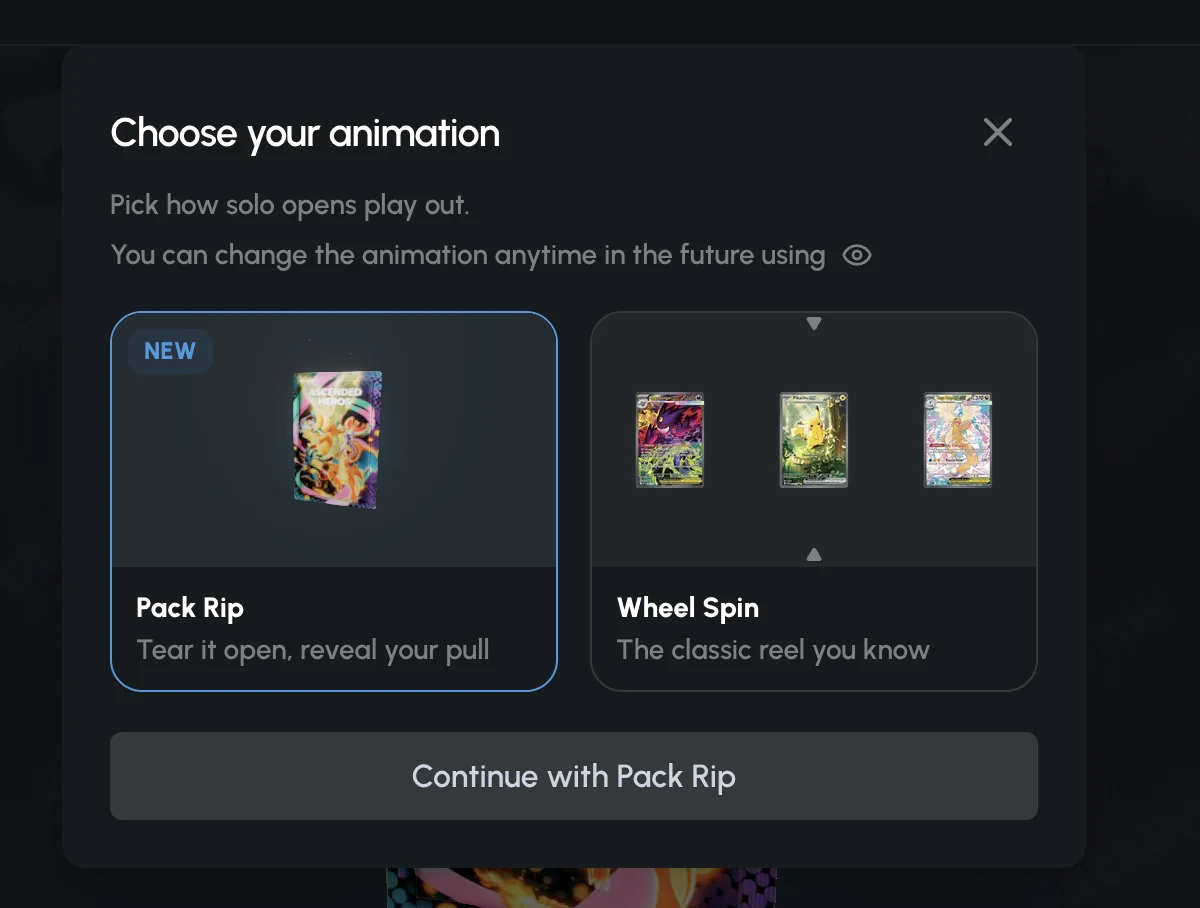
PackDraw’s Choose your animation menu offers two ways to reveal a solo pack opening: Pack Rip and Wheel Spin. Pack Rip is marked NEW and described as “Tear it open, reveal your pull”; Wheel Spin is “The classic reel you know.” The owner supplied the screenshots below on October 22, 2026. This guide explains the visible controls without treating a reveal style as a way to improve your chances.
What the Choose your animation menu shows
The menu says “Pick how solo opens play out.” Two illustrated tiles appear beneath that heading. In the captured example, Pack Rip has a highlighted border and the confirmation button says “Continue with Pack Rip.” The close icon is at the top right. This screenshot documents the menu’s appearance, not a recording of the full animation.

Hit the PackDraw Jackpot Round
Stack the wheel and chase 50× multipliers in Jackpot battles.
Pack Rip: the new pack-opening presentation
Pack Rip is presented as a tear-and-reveal style, with a pack illustration on its tile. Choose it if you prefer a presentation resembling opening a trading-card pack rather than watching a reel. The NEW badge identifies the feature in this captured interface; it does not date the feature’s original release.
The screenshot was taken while opening Ascended Heroes, a Pokémon-themed pack priced at $2.79 at the time. The animation selection is a presentation setting, not a purchase of a sealed Pokémon booster. Your possible prizes are those in PackDraw’s own listed drop table. Read our Pokémon packs guide for a recorded opening and the difference between listed item value and receiving a physical card.
Wheel Spin: the classic reel
Wheel Spin is the second option and is illustrated with cards between reel markers. Its description calls it the classic reel. It is the choice for readers who prefer that familiar presentation to Pack Rip. The supplied still image does not establish which animation is faster or whether either can be skipped, so we do not promise a speed advantage.
A near-miss in an animation is not another awarded prize. Use the final item and its recorded history when reviewing an opening; the surrounding graphics do not provide evidence that your next result will improve.
How to choose and change your animation
- When Choose your animation appears during a solo opening, review the Pack Rip and Wheel Spin tiles.
- Select your preferred tile. The captured Pack Rip selection is outlined and reflected in the confirmation button.
- Confirm the selection. With Pack Rip selected, the captured button reads “Continue with Pack Rip.”
- To change it later, use the eye icon. The menu explicitly says you can change the animation anytime using that icon.
The eye icon also appears near the top right of the supplied solo pack result screen. If you cannot locate it, return to the pack-opening view and check the current interface rather than assuming the setting lives in your profile. You do not need to purchase extra packs just to experiment with a visual preference.
Reading the final result
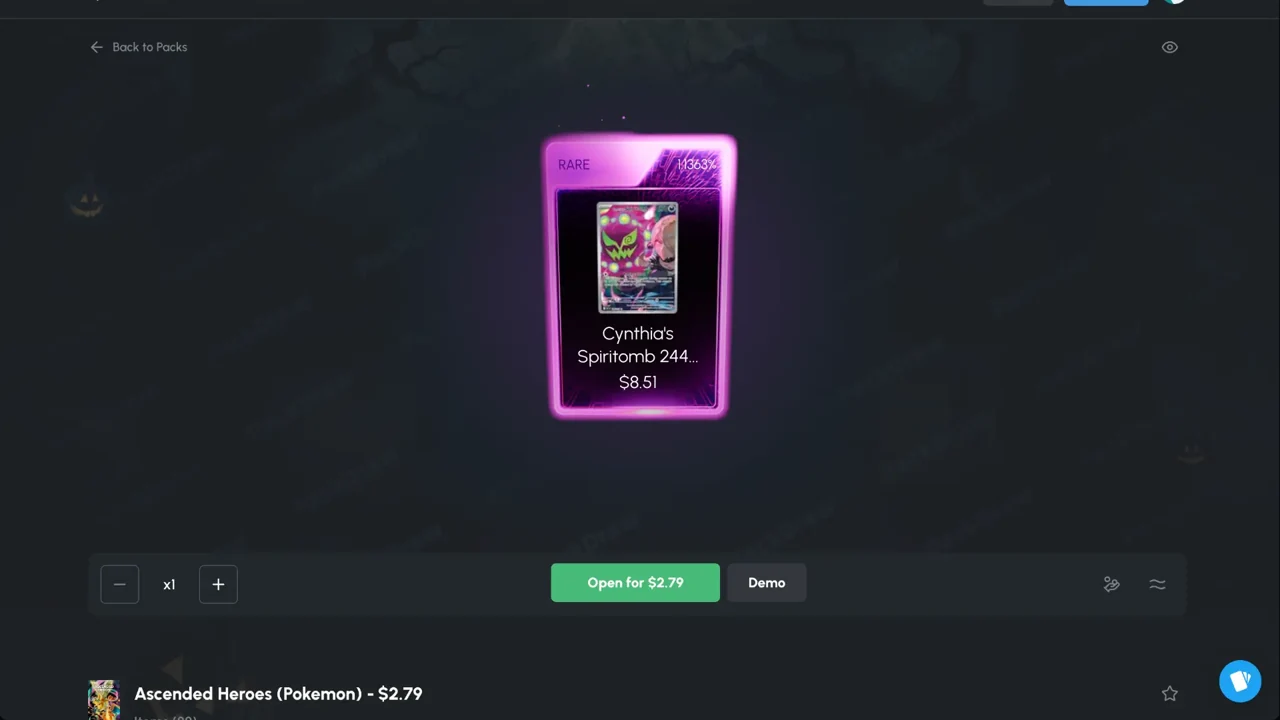
The recorded result displays a RARE reveal for Cynthia’s Spiritomb, valued at $8.51, with an “Open for $2.79” button underneath. Those numbers describe that one opening and its displayed prize value. They are not the price of the animation or a guaranteed cash return.
After an opening, inspect the item in your cart. The supplied cart has Sell, Withdraw and Exchange controls. Review the available choices before confirming anything: a displayed item value, on-site balance and a payment arriving in an external wallet are different things. Our cart guide and withdrawal guide show the relevant controls.
Does the animation show different odds?
No odds adjustment, prize boost or price modifier is displayed in the supplied animation menu. That is evidence of what the menu shows, not an independent audit of PackDraw’s software. Do not choose an animation on the assumption that it pays more.
Check the pack’s complete drop table before spending. In the owner’s Ascended Heroes screenshot, several top prizes each show 0.0100% probabilities; those are individual item probabilities, not the chance of any profitable result. The final result’s Pack History includes opening mode, seed fields, nonce and ticket number. Seeing those fields is not the same as independently reproducing the draw. Read our pack odds explanation and provably-fair guide to distinguish the checks.
Pack Battles — winner takes all
Real rivals, real items. Battle 1v1, 2v2, or all-in jackpots.
Animation is not a battle mode
The menu describes solo opens. It does not demonstrate support for battles, Draw or Deals. Pack Rip and Wheel Spin should not be confused with Borrow Mode or a battle’s winner rules. Those are separate subjects covered in our Pack Battles guide.
For other recent changes, visit PackDraw Updates 2026. Keep a fixed entertainment budget whichever reveal you prefer, and do not chase a loss because an animation looked close to a valuable prize.
Illustrative header photo: Peter Laskowski, Pexels. Article screenshots supplied by the PackDrawInsider owner; this is an affiliate site, not official PackDraw support.
Frequently asked questions
What is Choose your animation on PackDraw?
It is a menu for choosing how solo pack openings are presented, with Pack Rip and Wheel Spin options in the owner’s October 2026 screenshot.
How do I change Pack Rip back to Wheel Spin?
The menu says the eye icon lets you change your animation anytime. Open that control, choose Wheel Spin and confirm the current selection.
Win luxury items, shipped to your door
Watches, electronics, sneakers and rare collectibles.
Does Pack Rip cost extra or improve my odds?
No extra fee or odds boost is displayed in the supplied animation menu. Check the pack price and full drop table; this screenshot is not an independent audit of the draw system.
Is Pack Rip a new Pack Battles mode?
No. The menu specifically refers to solo opens. The screenshot does not establish animation availability in battles, Draw or Deals.
Which animation is faster?
The supplied screenshots are still images, so they do not establish comparative speed or whether either animation can be skipped.
Insider newsletter launching shortly
Promo alerts and weekly pack picks. Sign-ups open soon.
Related guides
Best PackDraw Packs for Beginners 2026 (Top 7 Picks)
Entering the category of luxury mystery packs can be an exhilarating experience, offering access to high-end designer gear, rare collectibles, and cutting-edge tech through a digit…
What Is PackDraw? Complete 2026 Mystery Pack Site Guide
In the evolving landscape of high-end collectibles and digital retail, mystery box experiences have transitioned from niche hobbyist forums to mainstream luxury platforms. At the c…
Is There a PackDraw Mobile App?
For luxury mystery pack openings, accessibility is everything. Whether you are tracking a high-end designer drop from your commute or engaging in a high-stakes head-to-head battle …